
Architecture
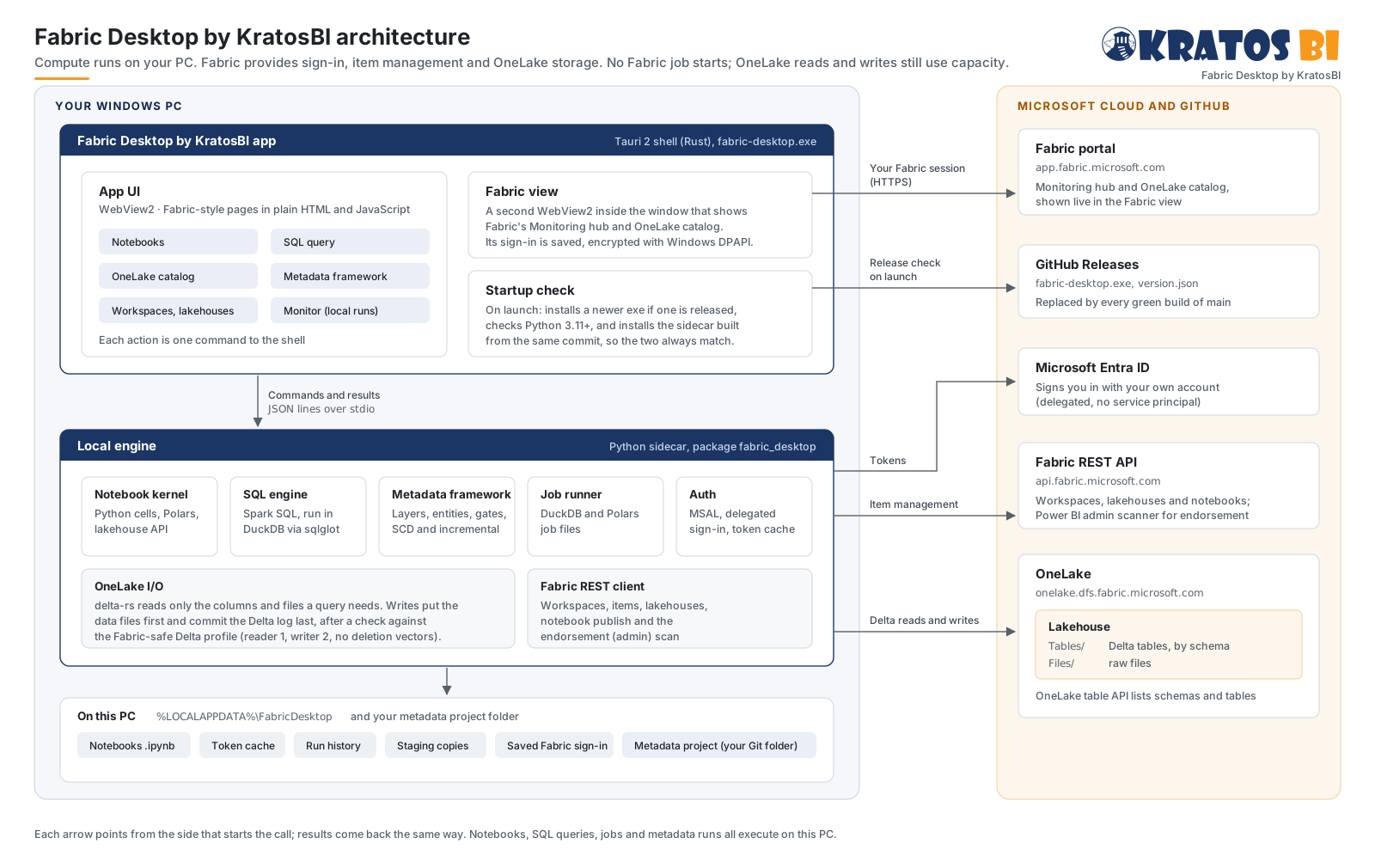
Fabric Desktop by KratosBI does Microsoft Fabric data engineering work on your own Windows PC and writes the results straight into OneLake. Fabric is used for sign-in, for managing items and for storage. Notebooks, SQL queries, jobs and metadata runs all execute on the PC, so they start no Fabric job; their OneLake reads and writes still use capacity.
The pieces#
Fabric Desktop by KratosBI app (app/)#
fabric-desktop.exe is a Tauri 2 shell written in Rust. It holds two WebView2 views and starts the local engine.
| Part | What it does | Code |
|---|---|---|
| App UI | The Fabric-style pages: Home, Create, Workspaces, OneLake catalog, Fabric, notebooks, SQL query, Metadata and Monitor. Plain HTML and JavaScript with no build step. activity.js holds the environment picker, the activity tray and plain-language errors. Each data action is one rpc command to the shell. |
app/ui/ |
| Fabric view | A second WebView2 laid over the page, showing Fabric's own portal from app.fabric.microsoft.com: full page on the Fabric page, where item links across the app open, and the Monitoring hub on Monitor. It has its own WebView2 profile that uses Windows single sign-on. Its sign-in cookies are saved every few seconds, encrypted with Windows DPAPI, and restored before the next launch's first page load. Links that leave Fabric open in the default browser. |
fabric_view_show, mod signin in app/src-tauri/src/main.rs |
| Startup check | Before the engine starts: if GitHub Releases has a newer build, it downloads it, checks the file is that build, swaps the exe and restarts. It then checks Python 3.11 or later, and installs the sidecar from the commit the exe was built from, so the exe and the engine always match. | check_components, app/src-tauri/src/updater.py |
Local engine (sidecar/)#
The Python package fabric_desktop, run by the shell as python -m fabric_desktop.server. It reads one JSON request per line on stdin and writes one JSON response per line on stdout. Service in service.py lists every method the UI can call.
| Module | What it does |
|---|---|
Notebook kernel (notebook.py, lakehouse.py) |
Runs notebook cells in one Python namespace. The lakehouse module is the notebook API: read_csv, read_parquet and read_json for Files/, plus read_table, write_table and sql. |
SQL engine (sql.py, sql_dialects.py, sql_format.py) |
Takes Spark SQL, as Fabric's SQL query tab does. sqlglot translates each statement to DuckDB SQL. Every table the query names becomes a DuckDB view over that table's Delta dataset in OneLake. sql_dialects.py lists the dialects the SQL page edits (Spark SQL, Fabric Warehouse, SQL analytics endpoint and SQL database T-SQL, DuckDB) and which run on this PC; sql_format.py formats SQL with sqlglot and refuses any change beyond layout and case. The page's editor is app/ui/sqleditor.js (CodeMirror 6), with completion from a metadata provider so Warehouse metadata can plug in later. |
SQL compatibility (sqlcompat/) |
Checks SQL against a Fabric engine's documented rules without running it: profiles per engine, versioned rules with sources and confidence, and an analyzer that reports findings with positions. Shown as editor diagnostics and the Compatibility panel. See sql-compatibility.md. |
SQL execution (sql_exec.py, sql_worker.py, sql_policy.py) |
The SQL page's managed runs: each query is classified (read, session change, lakehouse write, outside change) before it runs, then runs in a process of its own with DuckDB's memory limit, a temp folder and external access locked off. A queue caps how many run at once; Stop and the time limit end only that process. The result streams into an Arrow IPC snapshot that pages and exports (CSV, Parquet) read by batch, so large results are never held in memory. One audit line per run, without the SQL. See sql-execution.md. |
Metadata framework (meta/, meta_service.py) |
Layers, entities, the four gates, SCD Type 1 and 2, incremental loads, quarantine and promotion from Dev to Test to Prod. See the README. |
Fabric hand-off (cloud_service.py, fabric_run.py, maintenance.py, semantic.py, profiling.py) |
The work that deliberately uses Fabric capacity: Run in Fabric and schedules for published notebooks (with the setup cell that makes fabric_desktop.lakehouse work in a Fabric Python notebook), table health and Fabric's table maintenance job (OPTIMIZE with V-Order, VACUUM), and a Direct Lake semantic model written as TMDL. Profiling runs locally and suggests [[clean]] and [[check]] blocks. |
Fabric compute (fabric_compute.py) |
Metadata runs for an environment set to run on Fabric: uploads the engine and project to LH_Meta/Files/_fabric_desktop/current, publishes the runner notebook nb_fabric_desktop_runner, starts or schedules it with Fabric's job scheduler, and reads its results file back. Inside Fabric, run_bundle runs the same Engine against the same OneLake tables. |
Git (git/, git_service.py) |
Source control: runs the person's own git with prompts off, literal paths and only the https, ssh and file protocols. repo.py reads status, diffs, branches and history and stages and commits; ops.py runs clone, fetch, pull and push in the background so the engine keeps answering; secrets.py scans staged files before a commit and removes credentials from every message. Sign-in is Git Credential Manager or the SSH agent; the engine never sees a password or token. |
Local data projects (localdata/, localdata_service.py) |
A persistent DuckDB database per project on the PC. Registered folders of CSV, JSON, Parquet and Delta files become views (discovery.py names them), queried with limits, time-outs and cancel. No sign-in. See local-data.md. |
Job runner (jobs.py, publish.py) |
TOML job files that run DuckDB SQL or a Polars script and publish the result. |
Auth (auth.py) |
MSAL public-client sign-in as you (delegated, no service principal). Tokens for Fabric, Azure Storage and, when consented, the Power BI admin API. The token cache is on the PC. |
OneLake I/O (onelake.py, publish.py, delta_profile.py) |
Builds OneLake paths, lists files and tables, and reads and writes Delta with delta-rs. |
Fabric REST client (fabric_api.py) |
Workspaces, items, lakehouses, notebook publish, job instances and schedules, table maintenance, semantic models, SQL endpoint metadata refresh, and the admin workspace scan used for endorsement. |
Workloads (workloads/, workload_service.py) |
One inventory of what runs where: metadata entities per environment, notebooks on this PC and their Fabric items, and pipelines, notebooks and Spark jobs in the workspaces the app works in. Reads existing records only (run logs, fabric_runs.jsonl, PC and Fabric schedules) and says how fresh each reading is. Ownership, links and actions taken from the app are kept in workloads.sqlite. |
On this PC#
%LOCALAPPDATA%\FabricDesktop holds:
- notebooks (
notebooks\*.ipynb) - the MSAL token cache
- run history, and the jobs this app started in Fabric (
fabric_runs.jsonl) - workload owners, links to Fabric items and actions taken from the app (
workloads.sqlite) - local staging copies of each write
- catalog favorites
- the list of repositories opened in Source control (
git_repos.json; the repositories themselves stay where you put them) - the Fabric view's profile and its saved, encrypted sign-in
sidecar.log
A metadata project is a folder you choose and keep in Git.
Microsoft cloud and GitHub#
| Service | Used for |
|---|---|
| Microsoft Entra ID | Signing you in |
Fabric REST API (api.fabric.microsoft.com) |
Listing and creating workspaces, lakehouses and notebooks |
OneLake (onelake.dfs.fabric.microsoft.com) |
Tables/ (Delta) and Files/ in each lakehouse. The OneLake table API lists schemas and tables. |
Fabric portal (app.fabric.microsoft.com) |
The pages shown in the Fabric view |
| GitHub Releases | The latest release: fabric-desktop.exe and version.json, replaced by every green build of main |
How a request flows#
- You click something in the app, for example Run on a SQL query.
- The UI calls
invoke("rpc", {method: "run_sql", params}). The shell writes it to the sidecar as one JSON line. - The sidecar attaches the lakehouse and translates the SQL. It opens each named table from OneLake with a storage token for your account, and DuckDB runs the query on the PC.
- The result goes back as one JSON line. The shell returns it to the UI, which draws the grid.
Every other action follows the same path. Only the work in step 3 changes.
Writing to OneLake#
lakehouse.write_table, Save as table, jobs and metadata runs all write the same way:
- The result is written to a local staging Delta table first. It is checked against the Fabric-safe Delta profile before anything leaves the PC: reader version 1, writer version 2, no deletion vectors, no column mapping and classic checkpoints.
- delta-rs writes the Parquet data files to
Tables/<schema>/<table>, orTables/<table>in a lakehouse without schemas. It then commits the Delta log in one atomic step, so Fabric never sees a half-written version. - The written table is checked against the profile again, and the write is added to the run history shown in Monitor.
Fabric registers a new table written from outside on its own schedule. Until then it can show under Unidentified, and refreshing the lakehouse in Fabric picks it up.
Sign-in and security#
- The app signs in as you through Entra ID. It has no service principal and no stored secret. Your access in Fabric is exactly your account's access.
- Tokens stay in the MSAL cache in your Windows profile.
- The Fabric view's sign-in cookies are encrypted with DPAPI, so only your Windows account on this PC can read them. Delete
fabric-view-signin.binto forget them. - Git sign-in is Git Credential Manager or the SSH agent. The app never asks for or keeps a Git password or token, refuses addresses that carry one, and removes credentials from Git's messages before showing or logging them.
- The sidecar only listens on stdin and stdout. It opens no network port.
Updates#
Every push to main runs CI on Windows: sidecar tests, a check of a regular package install, and the exe build. When it is green, the latest GitHub release is replaced. At the next launch the app sees a newer commit in that release, updates itself, and installs the matching sidecar.
Headless agent#
The same engine also runs without the app, as fabric-desktop agent run on a Windows or Linux server. The agent adds a durable SQLite job queue, schedules, retries, per-table write leases in each environment's LH_Meta, and an app identity (service principal or managed identity) in place of your sign-in. See agent.md and, for where it is headed, enterprise-roadmap.md.
Need a hand?
Find a fix in troubleshooting, or share a reproducible issue with the community.
Get support ↗Improve this guide on GitHub ↗